
HashiCorp Vault and BSL 1.1: What It Means and What to Do About It
Apr 14, 2026
ArticlePlan a Vault-to-OpenBao migration after HashiCorp BSL: keep the API, cut licensing cost and protect unseal keys with customer-held MPC.
Read article


Replace manual Shamir unsealing with OpenBao's PKCS#11 seal backed by DuoKey: seal options compared, Cockpit setup, seal stanza, init and troubleshooting.
Every OpenBao server starts sealed. Until something supplies the key that decrypts its root key, it can read its storage but can't decrypt any of it: no logins, no secrets, no API beyond status and unseal. With the default Shamir seal, that "something" is a quorum of people typing in key shares, on every node, after every restart.
This guide explains why that stops working at scale, compares the auto-unseal options OpenBao offers (cloud KMS, HSM via PKCS#11, Transit), and walks through the DuoKey PKCS#11 seal step by step, using the configuration as OpenBao's and DuoKey's official documentation show it. If you're here because of the HashiCorp licence change, the background is covered in HashiCorp Vault's BSL change and the OpenBao migration; this article is only about unsealing.
OpenBao encrypts its data in layers. In the words of the OpenBao seal concepts page: "most OpenBao data is encrypted using the encryption key in the keyring; the keyring is encrypted by the root key; and the root key is encrypted by the unseal key."
The root key is stored alongside the rest of OpenBao's data, but encrypted. Unsealing is the process of getting the plaintext root key back into memory so OpenBao can decrypt the keyring and, through it, everything else.
An unsealed instance stays unsealed until one of three things happens:
The second one is the operational problem. Restarts are routine: patching, node replacement, rescheduled pods, host failures. Every one of them puts that node back in the sealed state.
By default, OpenBao splits the unseal key with Shamir's Secret Sharing. A threshold of shares has to be submitted, one at a time, to reconstruct the unseal key and decrypt the root key. That's a sound design for keeping any one person from unsealing alone, and it's the right default for a single lab instance.
It gets harder as the deployment grows:
Auto-unseal moves the job to "a trusted device or service" (OpenBao's phrasing). At startup, OpenBao contacts that mechanism to decrypt the root key it reads from storage. No one has to be present.
OpenBao's seal configuration docs list the available seal types: cloud KMS seals (AliCloud KMS, AWS KMS, Azure Key Vault, GCP Cloud KMS, OCI KMS, OVHcloud KMS, T Cloud Public KMS), KMIP, PKCS#11, Static Key and OpenBao Transit. The three families most teams choose between:
The seal wraps OpenBao's root key with a key held in your cloud provider's KMS. Using the AWS KMS seal as an example, OpenBao needs the key ID, kms:Encrypt, kms:Decrypt and kms:DescribeKey permissions, and credentials, which OpenBao "strongly" recommends supplying through environment variables rather than the config file. The unseal key's custody sits with that cloud provider, and every node needs network access to it.
The PKCS#11 seal loads a vendor's PKCS#11 library and uses a key held in the HSM behind it. OpenBao lists tested vendors, including Securosys Primus HSM, Utimaco u.trust GP HSM and CryptoServer CP5, Nitrokey NetHSM and DuoKey SD-HSM. Two points apply to every vendor: the key must be created before OpenBao is initialized, and the library must be installed on each OpenBao host.
The Transit seal uses a second OpenBao cluster's Transit secrets engine as the unseal mechanism. That means running and securing another cluster, and managing a token for it: OpenBao recommends an orphan token (ideally periodic, without an explicit max TTL) with update capability on the key's encrypt and decrypt paths.
| Option | Where the unseal key lives | What you operate | Notable constraints |
|---|---|---|---|
| Shamir (default) | Split into shares held by people | Key-holder process for every unseal | Each node needs its own threshold of shares after every restart |
| Cloud KMS | Your cloud provider's KMS | Cloud credentials or IAM role, network path to the KMS | Custody tied to one provider |
| PKCS#11 (HSM) | Inside the HSM | HSM hardware or service, vendor library on each host | Key must exist before init; library not included in standard OpenBao containers |
| Transit | Another OpenBao cluster | A second cluster plus a long-lived token | The second cluster must be available whenever the first starts |
| PKCS#11 with DuoKey | A DuoKey Cockpit-managed vault (MPC via DuoKey SD-HSM, HSM, or software vault) | DuoKey PKCS#11 library plus a Cockpit auto-unseal app | AES-256 with CKM_AES_GCM only; key must be Active in Cockpit |
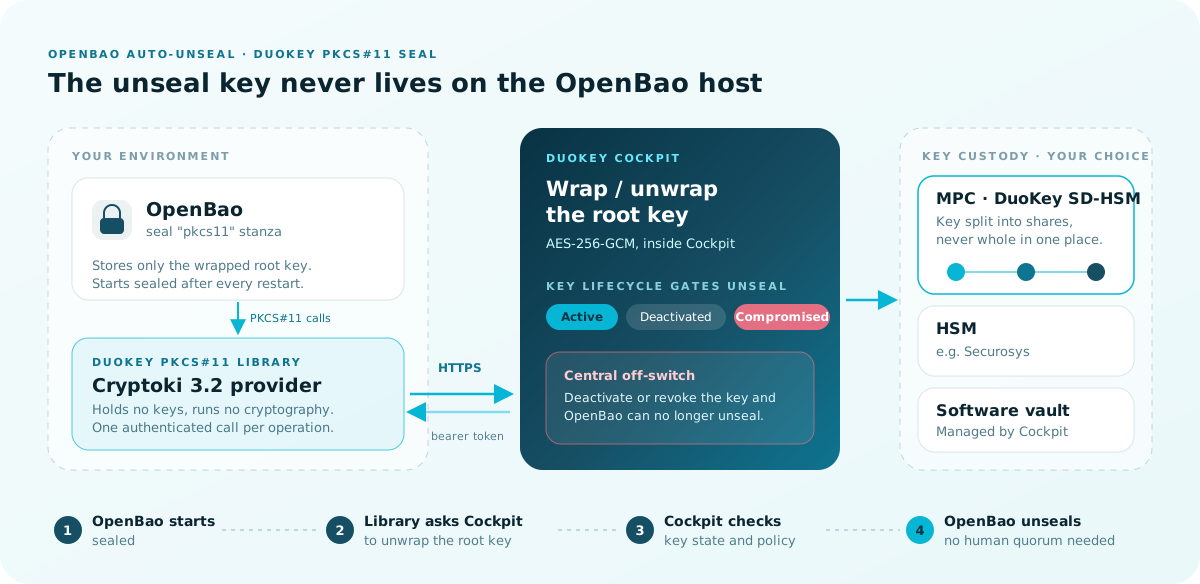
From OpenBao's side, DuoKey is a PKCS#11 HSM like any other on the tested list: you point the seal "pkcs11" stanza at a library and a key label. What sits behind the library is different.
The library holds no keys and runs no cryptography. According to the DuoKey PKCS#11 library docs, it's a standard PKCS#11 (Cryptoki) 3.2 provider that turns each call into one authenticated HTTPS request to the DuoKey Cockpit, which performs the operation against the vault that holds the key. Key material never resides on the OpenBao host.
The wrap happens in Cockpit. OpenBao's root key is wrapped and unwrapped with AES-256-GCM inside DuoKey Cockpit. OpenBao only stores the encrypted blob.
Custody is your choice of backend. The AES-256 key can live in any Cockpit-managed vault: a software vault, an HSM, or MPC. With MPC, DuoKey SD-HSM splits key material into shares so the full key never exists in one place. That's the option DuoKey's OpenBao + SD-HSM product is built around, replacing physical HSM hardware for auto-unseal.
Unsealing is gated on key state. The linked key has Cockpit lifecycle states (Active, Deactivated, Compromised). Deactivating or revoking it immediately blocks unsealing, which gives security teams a central, auditable off-switch for the vault.
Authentication is a bearer token, not the PIN. The library authenticates each request with an access token from its configuration file. OpenBao still requires a pin value in the seal stanza, but the library doesn't validate it or send it anywhere.
pkcs11.toml file, the seal stanza and a one-time access tokenlibdke_pkcs11.so on Linux), provided by DuoKey.so library; it uses the same Cockpit endpoint and the same linked key.DuoKey's integration supports CKM_AES_GCM (0x1087) only. OpenBao's DuoKey guide also shows an RSA-OAEP example, but DuoKey's setup guide states RSA-OAEP isn't yet supported by this integration. Use AES-256.
Create (or pick) an Active AES-256 key in any Cockpit-managed vault. Note its label; the seal stanza refers to it by key_label. OpenBao's docs are firm on this point: "Unlike Vault Enterprise, OpenBao requires key material to be created externally before initializing the instance."
In DuoKey Cockpit, deploy an OpenBao auto-unseal app linked to that key. Cockpit generates three things: the pkcs11.toml provider configuration, the seal stanza, and an access token.
The access token is shown once. Store it the way you store other secrets; to rotate it later, redeploy the app.
Copy the library to a known path on each OpenBao host, for example /usr/local/lib/pkcs11/.
Standard OpenBao containers don't include vendor PKCS#11 libraries. On Kubernetes, OpenBao's DuoKey guide gives two options: build a custom OpenBao image that includes the library, or inject it with an init container into /usr/local/lib/pkcs11/.
Save the generated pkcs11.toml on the OpenBao server. Its structure, per DuoKey's setup guide:
# /etc/dke/pkcs11.toml
[http_config]
server_url   = "<server-url-generated-by-cockpit>"
access_token = "<access-token>"
timeout_secs = 30
verify_tls   = true

[pkcs11]
slot_id        = 0
logging_level  = "info"
logging_folder = "/var/log/dke-pkcs11"
Then point the library at it before OpenBao starts:
export DKE_PKCS11_CONF=/etc/dke/pkcs11.toml
For systemd deployments, put DKE_PKCS11_CONF in the OpenBao service environment file (for example /etc/openbao.d/openbao.env) so the variable exists in the service's context, not only in your shell. Individual fields can be overridden per host with DKE_PKCS11_* environment variables (such as DKE_PKCS11_SERVER_URL or DKE_PKCS11_ACCESS_TOKEN); a non-empty environment variable takes precedence over the file.
Leave verify_tls = true. DuoKey's docs state that false disables TLS certificate validation and is for testing only.
Add a seal "pkcs11" block to your OpenBao configuration file (for example /etc/openbao.d/openbao.hcl):
seal "pkcs11" {
  lib       = "/usr/local/lib/pkcs11/libdke_pkcs11.so"
  slot      = "0"
  pin       = "1234"
  key_label = "bao-root-key-aes-256"
  mechanism = "0x1087"
}
| Parameter | Value for DuoKey |
|---|---|
lib | Path to the DuoKey PKCS#11 library. OpenBao's guide shows the file as duokey_pkcs11.so; DuoKey's setup guide names it libdke_pkcs11.so. Use the name of the file you were given. |
slot | "0" |
pin | Required by OpenBao; any value works, as the library authenticates with the access token instead |
key_label | The label of your AES-256 key in Cockpit |
mechanism | 0x1087 (CKM_AES_GCM) |
OpenBao can also take the same settings from environment variables instead of a config block: BAO_SEAL_TYPE=pkcs11 plus BAO_HSM_LIB, BAO_HSM_SLOT, BAO_HSM_PIN, BAO_HSM_KEY_LABEL and BAO_HSM_MECHANISM. See the PKCS#11 seal reference for the full list.
Start the server, then initialize it:
bao operator init
With an auto-unseal seal, initialization returns recovery keys, not unseal keys. They're split with Shamir's Secret Sharing, and OpenBao's seal concepts page lists recovery-shares, recovery-threshold and recovery-pgp-keys as the initialization parameters that control the split and encrypt the returned shares. Distribute them to your key holders as you would Shamir unseal shares.
If everything is configured correctly, the server unseals itself right after initialization. If it doesn't, check the server logs first.
Restart OpenBao and check its status:
sudo systemctl restart openbao
bao status
The key fields should show the PKCS#11 seal, an initialized instance and no seal:
Seal Type      pkcs11
Initialized    true
Sealed         false
Run the restart test on every node. With auto-unseal, each node unseals itself; there's no share quorum to collect.
If your cluster already runs on Shamir, you don't reinitialize. OpenBao supports seal migration from Shamir to an auto-unseal seal. Per the seal concepts page, migration requires cluster downtime, requires both the old and new seals to be available, and should be preceded by a backup.
The outline for Shamir to auto-unseal:
seal "pkcs11" block, start it, and run unseal with the -migrate flag, supplying the existing Shamir unseal keys.One caveat from OpenBao's PKCS#11 docs: PKCS#11 auto-unseal wasn't present in Vault 1.14 OSS, so it's not expected to be seal-compatible with it, and manual data migration between nodes may be required. Plan for that if you're coming from a Vault PKCS#11 setup. DuoKey's Vault to OpenBao migration page covers the wider migration path.
Rotating the seal key. OpenBao's PKCS#11 docs describe the procedure: create a new key with a different label, update key_label in the configuration, and restart OpenBao. Keep the old key available, because it's still needed to decrypt data wrapped under it.
Rotating the barrier and recovery keys. These are separate from the seal key. bao operator rotate-keys, authorized by the recovery key threshold, rotates the unseal (barrier) key; the new one is wrapped by the seal and stored, not returned to anyone. Adding -target=recovery rotates the recovery keys when you need different share counts, thresholds or holders.
Rotating the Cockpit access token. Redeploy the auto-unseal app in Cockpit, then update pkcs11.toml (or DKE_PKCS11_ACCESS_TOKEN) on each host.
Treat the seal key as a hard dependency. OpenBao's docs warn that recovery keys "cannot decrypt the root key, and thus are not sufficient to unseal OpenBao if the Auto Unseal mechanism isn't working. They are purely an authorization mechanism." If the seal mechanism or its keys are permanently deleted before a seal migration, the cluster can't be recovered, even from backups. In DuoKey terms: deactivating the linked key blocks unsealing and can be reversed by reactivating it; permanently deleting it can leave the cluster unrecoverable. Put deletion of that key behind the same controls as deleting the vault itself.
The table below follows DuoKey's setup guide. For initial setup, set logging_level = "debug" in pkcs11.toml (or DKE_PKCS11_LOGGING_LEVEL=debug) and check /var/log/dke-pkcs11/; set it back to info for production.
The lib path in the seal stanza is wrong, or the OpenBao process can't read the file. Confirm the file exists at that path on the host (or inside the container, if you injected it with an init container) and that the OpenBao user can read it.
key_label doesn't match any key in Cockpit. Check that the key exists in the vault the app is linked to and that the label matches exactly.
The access_token in pkcs11.toml doesn't match the app, or the app is disabled. Re-download pkcs11.toml (or redeploy the app to issue a new token), and confirm DKE_PKCS11_CONF is set in the OpenBao service's environment, not just in your interactive shell.
The linked key isn't Active: it's been deactivated, marked compromised or deleted. Auto-unseal is blocked while the key isn't Active. If the key was deactivated by mistake, reactivate it in Cockpit.
A network problem or a wrong server_url. Check connectivity from the OpenBao host to Cockpit over HTTPS/443 and compare server_url with the value Cockpit generated.
Q: Do I still get key shares with auto-unseal?
Yes, but they're recovery keys, not unseal keys. Operations that require a quorum under Shamir use the recovery keys instead. They authorize operations; they can't decrypt the root key, so they can't unseal OpenBao if the seal mechanism is unavailable.
Q: Where does the key that unseals OpenBao actually live?
In a DuoKey Cockpit-managed vault, never on the OpenBao host. The PKCS#11 library performs no cryptography locally; it forwards each operation to Cockpit, which wraps and unwraps OpenBao's root key with AES-256-GCM. If that vault is backed by DuoKey SD-HSM, the key is held with MPC, split into shares so the full key never exists in one place.
Q: Can I use an RSA key?
Not with this integration today. DuoKey's setup guide states auto-unseal supports CKM_AES_GCM against an AES-256 key only, and that RSA-OAEP isn't yet supported, even though OpenBao's generic DuoKey guide shows an RSA-OAEP example.
Q: What should I put in the pin field?
Any value. OpenBao requires the field, but DuoKey's library doesn't validate or transmit the PIN. Authentication comes from the access token in pkcs11.toml.
Q: How do I run this on Kubernetes?
Standard OpenBao images don't include the library. Build a custom image that includes it, or inject it into /usr/local/lib/pkcs11/ with an init container, and supply DKE_PKCS11_CONF (or the DKE_PKCS11_* variables) to the OpenBao container.
Q: What changes with OpenBao 2.7?
OpenBao states the PKCS#11 seal is built in through 2.6.x and available only as an external plugin from 2.7.0. For 2.7 and later, DuoKey's guide says to use its native OpenBao KMS plugin, which talks to the same Cockpit endpoint with the same linked key.
Q: Can I stop a vault from unsealing without touching the OpenBao hosts?
Yes. Unsealing is gated on the linked key being Active, so deactivating or revoking it in Cockpit blocks unsealing until the key is Active again.
Q: I already run OpenBao with Shamir. Do I have to reinitialize?
No. Use seal migration: add the PKCS#11 seal block, then unseal each node with -migrate and the existing Shamir keys, as described in Migrating an Existing Shamir Cluster. Take a backup first and plan for downtime.
Auto-unseal removes the people from routine restarts, but it makes the seal key the single thing your cluster can't live without. With DuoKey, that key sits in a Cockpit-managed vault, ideally held with MPC in DuoKey SD-HSM, under lifecycle controls your security team owns. For the managed service and wider context, see OpenBao + DuoKey SD-HSM and secrets management use cases.
DKE_PKCS11_CONF is set in the OpenBao service environment, and verify_tls is trueseal "pkcs11" stanza uses mechanism = "0x1087" and the exact Cockpit key labelbao operator init are distributed to their holdersbao status shows Sealed false)Written by
Nagib Aouini
Related Resources
Tell us where control is difficult today. We will help you identify a practical next step.
